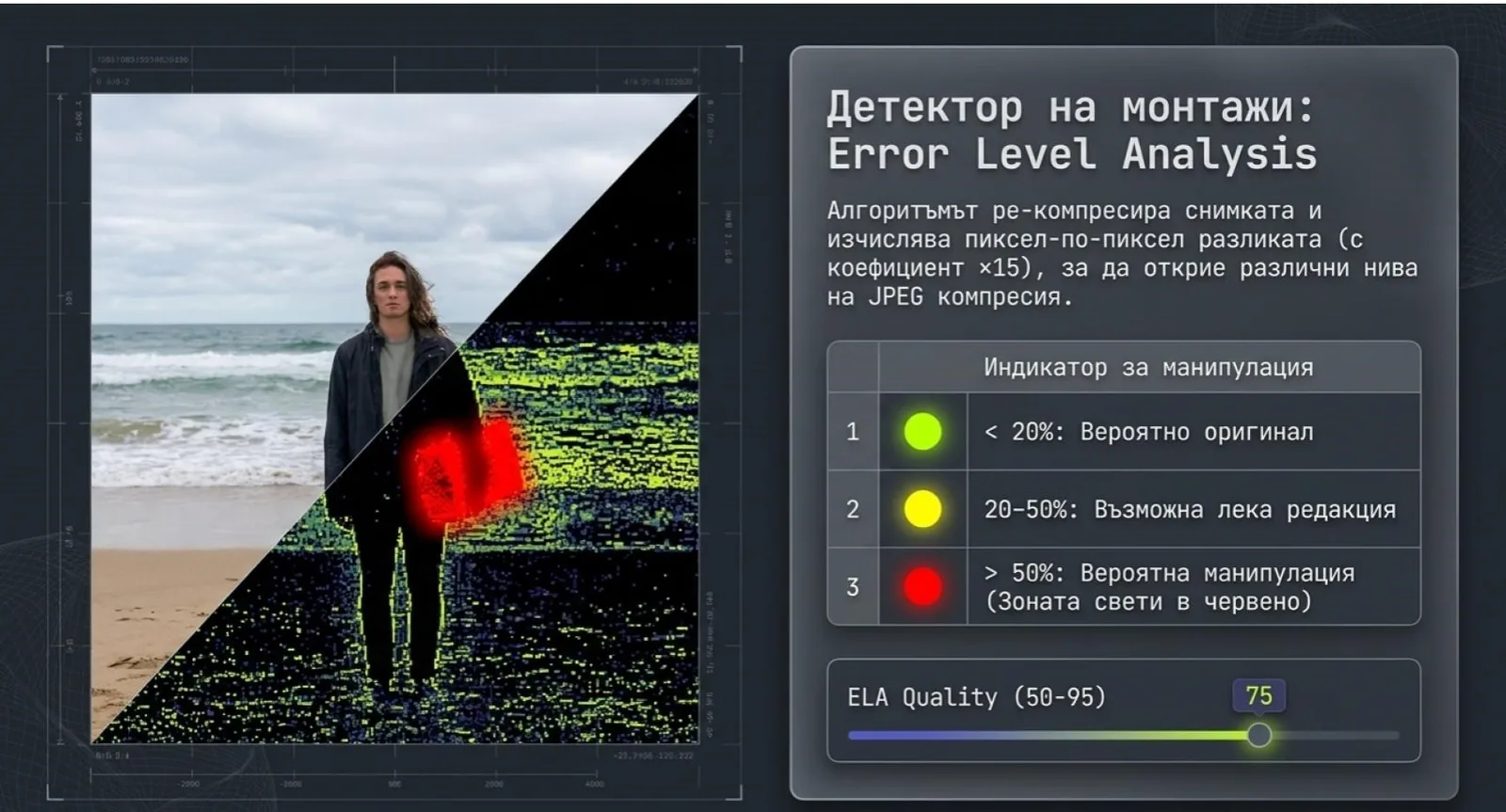
In an era of generative AI and accessible photo-editing tools, the ability to verify whether an image is genuine has become one of the most critical skills in journalism, law enforcement, and digital research. Organizations like Bellingcat, BBC Verify, DFRLab, and the New York Times Visual Investigations team have developed sophisticated methodologies for photo forensics that combine digital analysis with open-source intelligence (OSINT).
This article breaks down their core techniques — including Error Level Analysis, metadata forensics, and geolocation verification — and shows how tools like VerClood Pro make many of these methods accessible to everyone.
Technique 1: EXIF Metadata Cross-Checking
The first step in any forensics workflow is reading all metadata layers: EXIF (camera data), IPTC (news agency standard with author and location fields), and XMP (Adobe editing data with modification history).
What metadata reveals about authenticity
- Date/time inconsistencies — a photo claimed to show a 2024 event with EXIF showing 2019 is immediately suspicious
- Software editing traces — XMP fields reveal if Photoshop or Lightroom were used, and sometimes how many times
- GPS vs claimed location — coordinates can contradict a photo's reported location
- Camera serial number — can sometimes be cross-referenced to identify the original photographer
- Missing metadata — a completely blank EXIF in a "raw from the scene" photo suggests it was processed and re-exported, raising questions
- IPTC copyright conflicts — metadata claiming one copyright holder while the image appears elsewhere under another name
Bellingcat investigators routinely check for timezone anomalies — a photo's EXIF timestamp in UTC vs the local claimed timezone can reveal whether it was taken at the time claimed.
Technique 2: Error Level Analysis (ELA)
JPEG compression works by dividing an image into 8×8 pixel blocks and applying lossy compression to each. When a photo is saved as JPEG, every region reaches a similar "error level." If you take a portion of another image and paste it in, that pasted region will have a different error level — because it has a different compression history.
ELA works by:
- Taking the original JPEG
- Re-compressing it at a known quality (e.g., 75%)
- Computing the pixel-by-pixel difference between the two versions
- Amplifying the differences (typically 10–20×) to make them visible
VerClood Pro includes a full ELA analysis tool in its Forensics panel. You can adjust the re-compression quality (50–95%), run the analysis, and download the ELA result as a PNG for further examination — all without uploading your file anywhere.
Technique 3: Reverse Image Search & Provenance
Bellingcat's most frequent finding is not sophisticated Photoshop forgery — it's miscontextualization: real photos, from different places or times, presented as something they're not.
The toolkit for reverse image search in 2026:
- Google Images — drag and drop, or paste URL. Best coverage for news media.
- TinEye — specialized reverse image engine with timestamp data showing when images first appeared online
- Yandex Images — notably strong at matching modified images and faces
- Bing Visual Search — good for recent news images
If TinEye shows a photo first appeared in 2019, but it's being shared in 2026 as a "breaking news" image, that's a major red flag requiring further investigation.
Technique 4: Shadow and Light Analysis
When two images are composited together, it's difficult to perfectly match the lighting conditions. Investigators look for:
- Shadow direction inconsistency — shadows from different objects pointing in different directions indicate different light sources
- Shadow length vs claimed time/latitude — the Sun's elevation angle at a given GPS location and time produces predictable shadow lengths, calculable with tools like SunCalc
- Colour temperature mismatch — outdoor daylight vs indoor artificial light have very different colour temperatures; a subject lit with warm indoor light against a cool outdoor background is suspicious
- Reflection inconsistencies — reflections in windows, eyes, or shiny surfaces should be consistent with the stated scene
Technique 5: Geolocation Verification
Bellingcat became famous for geolocating conflict photos — identifying exact building corners, street furniture, power line configurations, and mountain silhouettes visible in the background of images, then cross-referencing with Google Earth, Yandex Maps, and OpenStreetMap historical data.
For images with GPS EXIF data, investigators cross-check:
- Do the GPS coordinates match the visual scene in the photo?
- Does the stated time of day match the sun position at those coordinates?
- Are the visible buildings, signage, and vegetation consistent with that location?
Technique 6: Embedded Thumbnail Detection
This is one of the most underappreciated forensics techniques. When a photo is taken, the camera embeds a small JPEG thumbnail in the EXIF metadata. When you later crop, edit, or Photoshop the image, most editing software updates the main image but forgets to update the embedded thumbnail.
Investigators who extract the EXIF thumbnail from a manipulated image sometimes find the original, unedited scene — showing objects that were cloned out, people who were removed, or context that was deliberately cropped away.
VerClood Pro's Forensics panel includes an embedded thumbnail detector that extracts and displays this hidden preview image when present, flagging it as a potential privacy risk.
🔬 Run Forensics on Your Own Photos
VerClood Pro includes ELA analysis, IPTC/XMP scanning, and thumbnail detection — all free, all private, no uploads.
Open Forensics Tool →Frequently Asked Questions
What This Means for Privacy
Understanding how forensics works is valuable from two opposite directions: if you're a journalist or researcher, it gives you a toolkit for verification. If you're a privacy-conscious individual, it reminds you just how much information your photos carry — and why stripping that metadata before sharing is so important.
The same EXIF data that Bellingcat uses to geolocate conflict photos can be used to locate your house from a photo you posted on social media. The same embedded thumbnail that reveals editorial manipulation could reveal the uncropped contents of your home from a photo you thought was safe.
Start with our complete EXIF removal guide and check out the 2026 Photo Privacy Checklist for a full protection workflow.